Ooky data workspace
Questions can use Brand Intelligence, Tracker rollups, citations, and available AI traffic sessions.
Studio can investigate your AI visibility or draft an article, FAQ, or comparison. It starts with saved Brand Intelligence, Tracker and citation rollups, and available crawler activity already in your workspace.
Which domains appear most often in our citations this month?
The answer identifies the strongest citation patterns. Your team can carry that finding into an article, FAQ, or comparison brief.
Ask a question with a clear reporting window, check the data Studio used, carry the finding into a brief, and keep approval with your team.
Start with a concrete window, such as which domains appear most often in your citations this month.
Studio names the Ooky data sections and tools that informed the answer, including the categories and queries it used.
Use the finding to set the topic, angle, audience, and notes. Studio prepares an article, FAQ, or comparison draft from the brief and your saved brand context.
Check the language, facts, and legal claims, then approve the draft when your team is satisfied. Publishing to your visible site remains a separate decision.
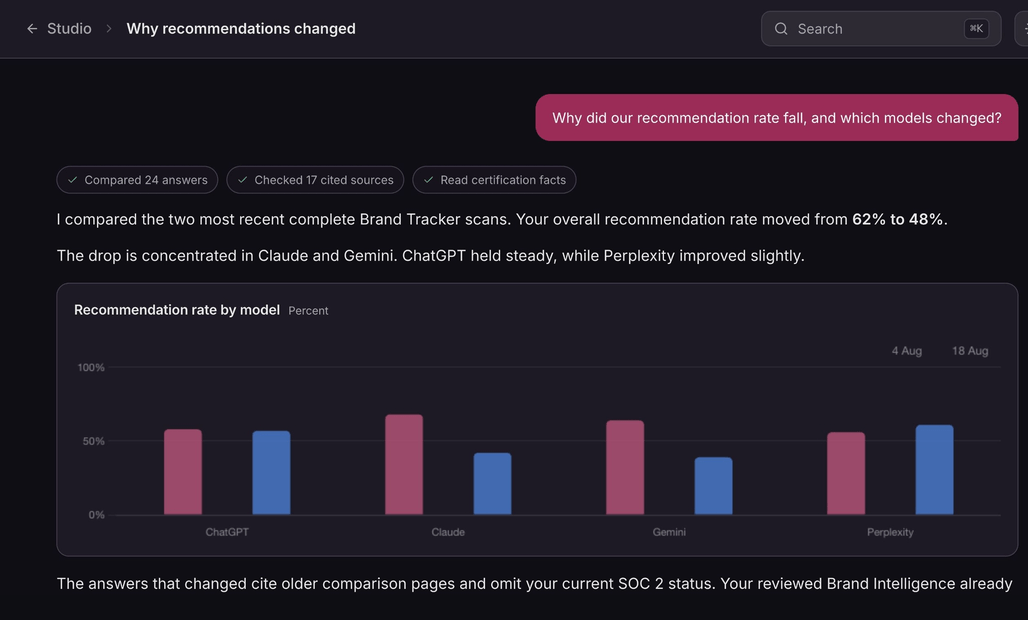
Studio starts with the active brand's saved Ooky data. In Analyze, the conversation names the data sections and tools that informed the answer. Write gives you an editable draft built from the brief and saved context.
Studio keeps the analysis, generated work, approval status, and later count distinct. In a conversation, it names the parts of Ooky that informed the answer.
Studio starts from saved Brand Intelligence and measured account data, then names the data sections and tools it used. A person still checks the facts, wording, and legal claims before anything ships.
Questions can use Brand Intelligence, Tracker rollups, citations, and available AI traffic sessions.
Article, FAQ, and comparison briefs use topic, angle, audience, notes, and private guidance.
Studio shows whether the result is still a draft or has been approved by a person.
What Studio can use, write, save, and measure.
Analyze can use the active brand's saved Brand Intelligence, Tracker rollups, citation evidence, and available AI traffic sessions. It answers in a conversation and names the data sections and tools that informed the answer. It does not expose raw tool results as source links.
The current Write brief supports articles, FAQs, and comparisons. Teams provide a topic and can add an angle, audience, and notes. The result is an editable draft that requires user approval.
Publication is a separate action. Articles, FAQs, and comparisons require review and approval, and Studio leaves changes to the visible site with your team.
Studio uses the active brand's saved Brand Intelligence plus private voice and avoidance instructions. It can also use Tracker rollups, citation data, and crawler evidence for analysis. That context narrows the task. Your approval covers the factual and editorial review generated prose still needs.
After a draft is applied, Studio can count fresh completed answers and show how many cited your own domain, with the total measured answers as the denominator. That later count shows what happened after the apply date; it does not prove the draft caused the result.
Yes. Conversations and drafts have dedicated pages and appear together in Studio, so your team can reopen the work later.